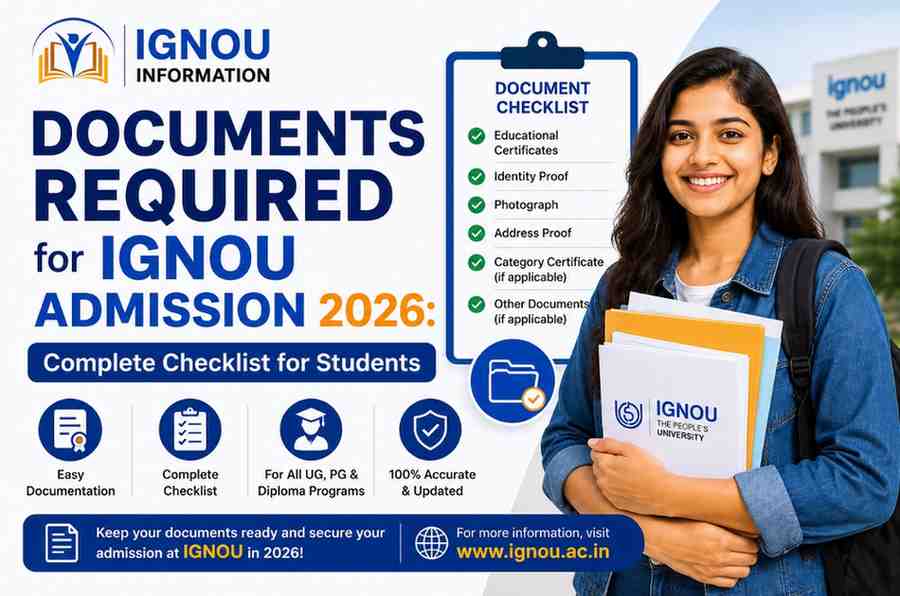
Documents Required for IGNOU Admission 2026: Complete Checklist for Students
Documents Required for IGNOU Admission 2026: Complete Checklist for Students
If you're planning to take admission in Indira Gandhi National Open University this year, one question probably keeps popping up in your mind — “which documents required for IGNOU admission 2026 do I actually need?” It's a fair question, and honestly, it's the one thing that trips up more students than anything else in the entire application process. Not the eligibility criteria, not the fee payment, not even choosing the right programme — it's the documents.
At IGNOU Information, we talk to students every single day who tell us the same story. They open the Samarth portal, they fill in their name and email, and then they hit the document upload section and everything grinds to a halt. Wrong file size. Wrong format. Missing a certificate they didn't even know they needed. It's frustrating, and it's completely avoidable if you prepare in advance.
This guide walks you through the exact list of documents required for IGNOU admission 2026, why each one matters, how to prepare them correctly, and the small mistakes that cause big delays. Keep this page bookmarked — you'll probably come back to it more than once while filling your form.
Read More:- IGNOU Fees Online Payment Guide 2026
Why Getting Your Documents Right Matters So Much
IGNOU admissions are handled entirely online through the Samarth portal now — there's no walking into a regional centre with a folder of photocopies anymore. That's convenient in many ways, but it also means the system is unforgiving about file formats, sizes, and completeness. A single wrong upload can push your application into a “rejected” or “on-hold” status, and by the time you notice and fix it, the admission window may have narrowed or even closed.
That's exactly why understanding the documents required for IGNOU admission 2026 before you even create your login is the smartest first step you can take. It saves you the back-and-forth, the resubmission emails, and the anxiety of watching a deadline get closer while your status still says “pending.”
Complete List of Documents Required for IGNOU Admission 2026
Here is the full checklist, organised by category, of the documents required for IGNOU admission 2026. Keep scanned copies of all of these ready on your computer or phone before you start the form.
|
Document |
Who Needs It |
Typical Size Limit |
Format |
|---|---|---|---|
|
Recent passport-size photograph |
All applicants |
Up to 100 KB |
JPG/JPEG |
|
Scanned signature |
All applicants |
Up to 100 KB |
JPG/JPEG |
|
Class 10 marksheet/certificate |
All applicants (proof of DOB) |
Up to 200 KB |
PDF/JPG |
|
Class 12 marksheet/certificate |
UG programme applicants |
Up to 200 KB |
PDF/JPG |
|
Bachelor's degree certificate/marksheet |
PG programme applicants |
Up to 200 KB |
PDF/JPG |
|
Category certificate (SC/ST/OBC) |
Reserved category applicants |
Up to 200 KB |
PDF/JPG |
|
APAAR ID / DEB ID |
All applicants (mandatory) |
Not applicable |
Text entry |
|
Experience certificate |
Programmes requiring experience |
Up to 200 KB |
PDF/JPG |
|
BPL certificate |
Below Poverty Line applicants |
Up to 200 KB |
PDF/JPG |
|
Entrance/qualifying exam scorecard |
MBA, B.Ed and select programmes |
Up to 200 KB |
PDF/JPG |
|
Government-issued ID proof |
All applicants |
Up to 200 KB |
PDF/JPG |
|
IMPORTANT • Exact size limits can shift slightly between admission cycles — always verify current specifications on the Samarth portal before uploading. • IGNOU Information updates this table every session, but the official portal remains the final word. |
Document-Wise Breakdown: What Each One Actually Means
1. Passport-Size Photograph
This needs to be a recent, clear photo — not something from three years ago that barely looks like you anymore. Plain background, no sunglasses, no caps, and definitely no filters. Admission officers do cross-check this against your ID card photo later, so keep it genuine.
2. Scanned Signature
Sign on plain white paper with a dark pen, scan it, and crop it neatly. A shaky or smudged signature is one of the more common reasons uploads get flagged for re-verification.
3. Class 10 and Class 12 Certificates
Your Class 10 certificate mainly serves as proof of date of birth, while your Class 12 marksheet is the actual eligibility proof for undergraduate programmes. If you're applying for a postgraduate programme, your bachelor's degree certificate takes over this role instead.
4. APAAR ID (Formerly ABC ID)
This is one of the newer additions to the documents required for IGNOU admission 2026, and it's now mandatory for every fresh applicant. You generate this through DigiLocker before you even begin your admission form. Skipping this step means you simply cannot proceed, so treat it as step zero.
5. Category Certificate
If you're applying under SC, ST, OBC, or any other reserved category, this certificate needs to be current and issued by a competent authority. An expired or outdated category certificate is a common rejection reason, so double-check the validity date.
6. Experience and Entrance Exam Documents
These apply only to specific programmes. MBA applicants, for instance, usually need to upload their entrance test scorecard, while certain diploma and certificate programmes ask for relevant work experience proof. Always check your specific programme guide, since requirements here vary more than any other category.
Most Related:- Is IGNOU Degree Valid for Government Jobs in 2026
Common Mistakes Students Make While Uploading Documents
We've seen these mistakes repeat across almost every admission cycle at IGNOU Information, and most of them are painfully easy to avoid:
|
Mistake |
Why It Happens |
How to Avoid It |
|---|---|---|
|
Uploading photocopies instead of originals |
Students scan an already-photocopied certificate |
Always scan the original document directly |
|
Ignoring file size limits |
Phone camera scans are often too large |
Compress using a free online tool before uploading |
|
Uploading blurry or tilted scans |
Poor lighting or rushed scanning |
Use a flatbed scanner or a dedicated scanning app |
|
Submitting an expired category certificate |
Certificate validity overlooked |
Check the issue date and renew if needed |
|
Forgetting the APAAR ID before starting |
Unaware it's now mandatory |
Generate it via DigiLocker a day in advance |
|
Mismatched name spelling across documents |
Certificates from different years/authorities |
Keep spelling identical everywhere, or carry an affidavit |
Step-by-Step: How to Prepare Your Documents Before Applying
1. List your programme's specific requirements — UG, PG, diploma, and certificate programmes each have slightly different document needs, so check your chosen programme's page first.
2. Generate your APAAR ID through DigiLocker — do this before you open the Samarth portal, not after.
3. Scan everything in one sitting — original documents, clear lighting, no photocopies.
4. Compress files to meet size limits — most rejections trace back to oversized uploads, not missing documents.
5. Rename your files clearly — something like signature_final.jpg instead of a random camera filename.
6. Cross-check spelling consistency — your name should read identically on your Class 10 certificate, Class 12 certificate, and ID proof.
7. Keep a backup folder — cloud storage or a pen drive, in case your device fails mid-application.
|
TIPS FOR APPLICANTS • Prepare and scan every document in a single sitting to avoid last-minute scrambling. • Keep a dedicated folder (cloud + local) with all scanned files named clearly before you log in to Samarth. • Double-check your name spelling matches exactly across all certificates before uploading. |
Following this order genuinely cuts down the back-and-forth that so many students go through, and it's the exact sequence IGNOU Information recommends to every learner who reaches out to us during admission season.
Why Documentation Errors Delay Your Admission
It's worth understanding the mechanics behind this, because it isn't arbitrary. IGNOU's verification system checks your uploaded documents against the eligibility criteria of your selected programme. If a document is missing, unclear, or doesn't match the required format, your application either gets stuck in a “documents pending” status or gets sent back for resubmission. Each resubmission cycle can add days, sometimes weeks, especially if there's a bottleneck of applications close to the last date. Given how firm IGNOU's admission deadlines tend to be, that lost time can genuinely mean missing an entire session.
A Quick Word From IGNOU Information
We've built this guide because we've seen too many capable students lose valuable time over document issues that had nothing to do with their actual eligibility. The documents required for IGNOU admission 2026 aren't complicated once you know the list — the real issue is usually not knowing what's needed until you're already halfway through the form. Preparing everything in advance, in the right format and size, is genuinely the single biggest thing you can do to make your application smooth.
Frequently Asked Questions
Q1. What are the basic documents required for IGNOU admission 2026?
The core list includes a passport-size photograph, scanned signature, Class 10 and Class 12 certificates (or bachelor's degree for PG programmes), category certificate if applicable, and a mandatory APAAR ID.
Q2. Is the APAAR ID compulsory for all applicants?
Yes. The APAAR ID (formerly ABC ID) is mandatory for every fresh applicant in the current admission cycle and must be generated through DigiLocker before starting the application.
Q3. What file format and size are accepted for document uploads?
Most documents are accepted in JPG or PDF format, typically under 100–200 KB, though photographs and signatures usually have a stricter 100 KB limit. Always check the exact specification on the Samarth portal at the time of applying.
Q4. Can I submit photocopies instead of scanned originals?
No. IGNOU requires scanned copies of original documents. Uploading a scan of a photocopy often results in unclear images and can lead to rejection.
Q5. What happens if my documents don't match the eligibility criteria?
Your application may be marked as incomplete or placed on hold until you submit the correct document. This can delay your admission confirmation, so it's best to verify everything before your first upload attempt.
Q6. Do I need an entrance exam scorecard for every programme?
No, only specific programmes such as MBA, B.Ed, and certain doctoral programmes require an entrance or qualifying exam scorecard. Most UG and general PG programmes don't need this.
Q7. Is a category certificate mandatory for general category students?
No, the category certificate is only required for applicants seeking admission under SC, ST, OBC, or other reserved categories.
Conclusion
Getting your paperwork right is genuinely 80% of the battle when it comes to a smooth IGNOU admission. Once you have the documents required for IGNOU admission 2026 scanned, correctly sized, and organised in one folder, the actual online form takes barely twenty minutes to complete. The students who struggle are almost always the ones who start uploading before they've prepared, not the ones who take an extra day to get everything ready first.
Use the checklist and tables above as your final preparation guide before you log in to the Samarth portal, and keep this page handy in case you need to double-check anything mid-application. IGNOU Information will keep this guide updated through the admission cycle, so if anything changes on the official portal, you'll find the update reflected here too. Good luck with your application — get your documents sorted, and the rest of the process really does fall into place.
Apply Now
Please fill the form with the correct details
Trending Posts


![IGNOU Result 2026 [Check Now]: Result Updated](/admin/admin-assets/img/blogs/1787220864.jpg)



![IGNOU B.Ed Admission 2026 [Apply Before Deadline] – Complete Guide On Eligibility And Fees](/admin/admin-assets/img/blogs/1786518241.jpeg)













![IGNOU ID Card Download 2026 [Direct Link] Enrollment No., PDF Password & Step-by-Step Guide](/admin/admin-assets/img/blogs/1782287869.jpeg)




























Frequently Asked Questions
Find answers to common questions